
training
Copilot
training_
get more done in the same time.

what exactly does the copilot training involve?
Our Copilot training is a practical session in which your team learns how to use Microsoft 365 Copilot in the tools you use every day: Word, Excel, PowerPoint, Outlook and Teams. We show what Copilot can and can't do, how to get consistent output with the right context and prompts, and how to apply it directly to your work, such as emails, documents, meeting summaries and analyses.
During the training, you learn to turn loose input into usable output. An email that is right first time, a document that is neatly structured, or a meeting that ends with clear action points. We work with situations you recognise from your own work.
an applicable story



finally really
getting started
Many companies are now purchasing Copilot and making it available. What's missing, however, is a clear approach to using it efficiently. And without guidance, it often stays at a bit of trial and error, with varying results.
Copilot adoption doesn't start with buying a licence and then hoping everyone can make good use of it. That's why, during our training, you get to work on your own tasks. That way you experience first-hand where Copilot adds value, how to steer it well and how to use it structurally in your daily work.

practical and
concrete
tailored to your company

up-to-date
knowledge

start
right away
we start with an intake


We tailor our trainings and sessions as closely as possible to your situation. That's why we always start with a digital intake in which we ask you a number of questions about your current AI tools, your company and the work of you and your colleagues.
we prepare the session to fit you
Then we get to work preparing the training or session so that it matches your wishes. We take concrete examples from your market to paint a realistic picture of the possibilities.
we run an interactive session on location or online
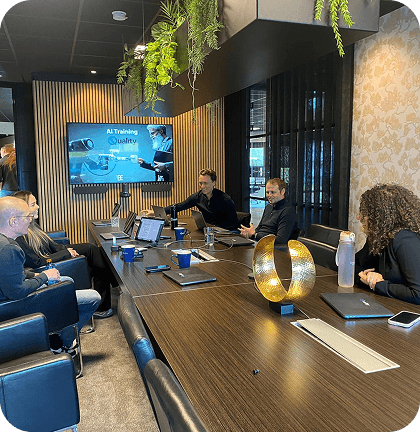
We're happy to come to your location, but we also offer trainings at our office. The session is always interactive, so a laptop or tablet is required. That way everyone can experience the possibilities for themselves and you immediately know where the options are that you want to use. The session lasts between 1.5 and 2 hours on average, but can also be extended depending on your wishes. There is always room for questions.
you receive an overview with concrete takeaways
After the training, you receive the slides from us and a number of sheets with tips & tricks, including a list of handy prompts. If you still have questions after the training, we're always available to help someone get going!
our approach
Our approach consists of an intake, a tailor-made session and a practical follow-up with concrete tools.
view our training cases

clients who got there before you :








frequently asked questions about our Copilot training
Is the training for everyone?
Yes. We tailor the content to roles and tasks. Whether you work in sales, marketing, HR, operations or management, Copilot can support every role.
Do you need prior knowledge of AI?
No. We explain the basics clearly and then move quickly to practice. For the more advanced, we adapt the session so it goes deeper than just the basics. We determine the level during the intake.
How long does a session last on average?
Usually 1.5 to 2.5 hours. Prefer more depth and practice time? Then we do, for example, a half-day training.
Can the session also be held online?
Yes. We run sessions both on location and in an interactive online setting. Both are possible, depending on your preference.
What exactly will we learn during the training?
You learn to use Copilot smartly in Word, Excel, PowerPoint, Outlook and Teams. We look at different areas such as writing texts, creating summaries, carrying out analyses, extracting action points from meetings and setting up presentations. If desired, we can also look at more advanced applications such as building Agents and setting up Agentflows.
Do you work with examples from our organisation?
Yes. We use recognisable tasks and examples from your work, so everyone immediately understands what it delivers and how to apply it.
Do we need Microsoft 365 Copilot licences?
The standard Microsoft Office environment already includes a version of Copilot that everyone can use. The more expensive version offers more possibilities; it’s not a ‘must’ but does offer opportunities. During the intake, we can discuss where you stand and what best fits your organisation.
How do we make sure Copilot is used safely?
Safety is high on our list. We include best practices for responsible use and explain what you should and shouldn't share, how to check what comes out and which agreements to make internally.
Do we take anything away afterwards?
Yes. You receive the slides and a summary with prompt structure, example prompts and tools to help Copilot land well internally.
What is a good group size?
For the training, we aim for a group size of around 10 participants. That leaves enough room for questions and personal guidance, and lets everyone practise actively. Want to go with a larger group? Then we can also offer this as an inspiration session, where the focus is more on insights and examples. The group size then doesn't matter.
get started with Copilot ?_
Fill in your details and we'll get in touch.